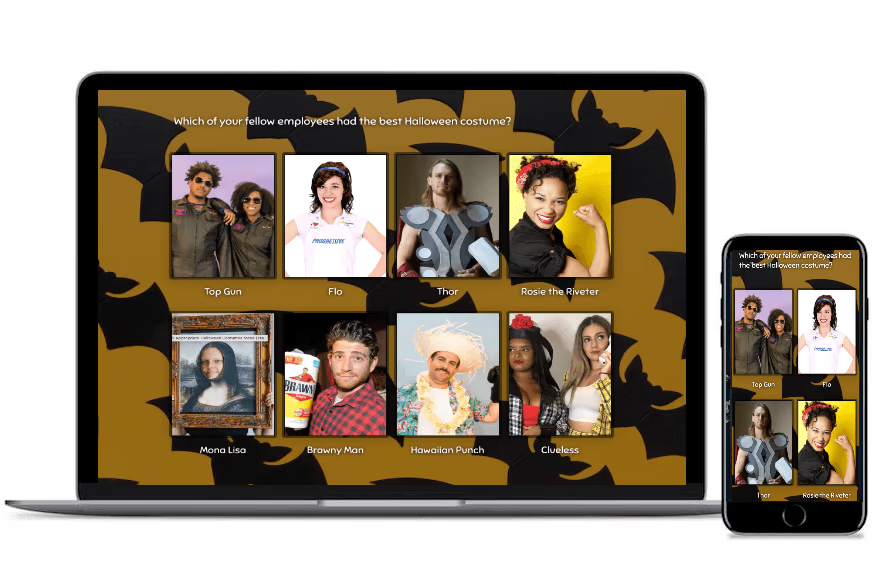
Host a Halloween costume contest by choosing categories, collecting entries, sharing clear judging or voting rules, and announcing the winners. A Halloween costume contest can include adults, children, groups, couples, and pets, with separate awards for the categories you choose.
Halloween 2026 falls on Saturday, October 31. Whether your contest is at school, the office, a party, or a community event, this guide covers categories, entry pictures, judging and voting rules, and announcing a winner. You’ll also find a SurveyLegend voting tutorial, adult, children’s and pet poll examples, costume inspiration, and a little costume history.
SurveyLegend helps you collect audience votes through a picture poll. People can compare the costumes and select or rank their favorites from a phone or computer. Already have your contest rules? View setup steps.
To host your Halloween costume contest:
- Choose who can enter and which categories you’ll award.
- Announce the entry deadline, prizes, judging criteria and voting rules.
- Collect costume pictures and permission to display them.
- Prepare the judges’ scoring or audience voting poll.
- Close voting and review the results using your announced rules.
- Resolve any ties and announce the winners.
Halloween Costume Contests
A Halloween costume contest is a competition in which people or pets enter costumes for judging or audience voting. A Halloween costume contest can award one overall winner, separate category winners, or a people’s choice prize.
Some contests are just for bragging rights; others offer gift cards, treats, trophies, or cash prizes. You can run yours at an event, collect photos online, or let people at the event vote through the same picture poll as those joining from home.
Looking for “Halloween costume contests near me”? Check local event listings, community groups, schools, and venues. Prefer to host your own? Set the categories, collect the photos, and create your SurveyLegend voting survey.
What should you decide before collecting costume entries?
Choose who can enter, whether entries are individual or team costumes, and how many entries each contestant can submit. Set an entry deadline, a voting period, and an announcement time. For an online contest, include the time zone.
Tell people which category to enter, what prizes are available, who can vote, and whether contestants can vote for themselves. Decide how to handle ties before the poll opens. A shared prize, runoff vote, or judge’s deciding vote can work—choose the approach that suits your event.
Pets can join a separate category too. From a dog dressed as a hot dog to a cat channeling a movie character, there’s plenty of room for a little furry fun!
Halloween Costume Contest Categories and Judging Criteria
Choose costume contest categories that give different kinds of creativity a chance to win. Scariest, cutest, funniest, most creative, most realistic, and coolest handmade costume all give voters something specific to consider.
Try these award categories:
- Scariest: The most convincing spooky character or creepy look.
- Cutest: A cheerful character, sweet costume, or adorable pet outfit.
- Funniest: The costume that gets the biggest laugh.
- Most creative: An original idea or unexpected interpretation.
- Most realistic: A convincing version of a character, creature, or object.
- Coolest handmade costume: A costume that shows off the maker’s crafting skills.
You can also separate groups, adult couples, adult singles, babies and toddlers, children and teens, and pets. Match each voting question to its category so a family costume doesn’t compete directly against a toddler’s outfit.
A theme can help everyone get started. Try movies, superheroes, or animals, and browse creative costume ideas on Pinterest for inspiration. Explain how originality will be judged rather than automatically ruling out a classic witch or ghost.
How should you judge a Halloween costume contest?
Judge costumes using the criteria you announced, such as creativity, theme fit, craftsmanship, and presentation. Apply the same criteria to everyone in a category.
For example, judges could score each criterion from 1 to 5 and add the scores. That’s one possible system, so share your chosen scale in advance. A handmade award can focus on construction, while a funniest-costume award can focus on the audience’s reaction.
A people’s choice award asks voters to choose their favorite. You can offer it alongside a judges’ award, but keep the results separate. The most carefully crafted costume and the crowd’s favorite don’t have to be the same entry!
Designing Your Halloween Costume Contest Survey
Create your Halloween costume contest survey by adding a photo of each entry, writing the voting question, and choosing how people should vote. SurveyLegend’s picture surveys let people select images as answers, so your audience can see the costumes they’re choosing.
Ask contestants to send photos to you before voting opens. Upload the eligible entries, label each photo with an entry name or number, and add instructions that match your contest rules. Use a separate question or poll for each category when you’re awarding separate winners.
What should contestants include with their costume photos?
Ask for a clear costume photo, an entry name or number, and the category. For a group entry, ask for one photo that shows the whole group.
Give everyone the same photo instructions:
- Show the costume clearly in good lighting.
- Use similar framing and image proportions across entries.
- Keep unrelated people and background clutter out of the photo.
- Send the entry before the deadline.
- Confirm that you may display the submitted photo in the voting poll.
For children’s entries, arrange photo submission and permission through a parent or guardian. Use entry numbers instead of children’s full names when names aren’t needed for voting.
Should people choose one costume or rank their favorites?
Use a single-choice vote when each person should choose one favorite. Use ranked voting when people should put several favorites in order.
For example, ask “Which costume is your favorite?” for a single-choice poll, or “Rank your three favorite costumes” for a ranked question. Explain how you’ll use the results to select a winner before voting starts.
SurveyLegend collects responses as people vote. You can watch the results in Live Analytics and decide whether to display them during the event or save them for the final reveal. Learn more about how to collect votes on images.
How to Set Up Costume Voting in SurveyLegend: 10 Steps
See SurveyLegend’s costume voting poll examples before setting up your audience vote.
Create your costume contest voting survey in SurveyLegend by uploading the entries as picture choices, setting the voting method, and sharing the link. Follow these ten steps:
- Log in to your SurveyLegend account. Create an account first if you’re new to the platform.
- Create a new survey. Open the CREATE step and write a clear question about the costume award.
- Add a Picture Selection question. Use picture choices to show the entries.
- Open the image upload controls. Select the question and choose the upload option.
- Upload the costume photos. Add all eligible images and label each choice with its entry name or number.
- Choose the voting method and layout. Let voters select one favorite or rank several. Adjust the picture layout and proportions so the costumes are easy to compare.
- Style your survey in DESIGN. Choose a Halloween theme or suitable background. Keep the voting instructions easy to read, even when the background gets spooky!
- Review the settings in CONFIGURE. Name your survey and check participation controls. The public guide calls the setting “Allow multiple participations”; leave it OFF to limit repeat submissions from the same browser. Check the setting’s explanation if your interface uses a different label.
- Preview, test, and share. Try the photos and voting instructions on a phone and computer. In SHARE, copy your link and send it by email, SMS, Facebook, Slack, or another channel your audience uses.
- Follow the votes in Live Analytics. End voting at your announced deadline and select the costume winner using the method you explained.
SurveyLegend’s participation setting reduces repeat submissions from the same browser; it does not guarantee one vote per person. For an invited group, password protection can restrict access, while a required email question gives you information to compare with your voter list. Review duplicate or suspicious responses before confirming the winner.
See our guide to preventing cheating and our password-protection instructions for setup details.
Check your plan’s current response, image, and feature allowances before inviting everyone. A free account is a starting point; available options depend on your plan.
At a live event, you can project the analytics page when showing results during voting is part of your plan. Watching the votes roll in can add excitement, while a final reveal keeps everyone guessing!
Adding another activity to your Halloween party? See our guide to hosting a pumpkin carving contest and give it separate entries and voting instructions.
Halloween Costume Contests with Images
A costume contest picture poll places the entries beside the voting question. The SurveyLegend examples below show adult, children’s, and pet costumes with Halloween backgrounds.
Use these examples to plan your poll’s layout and instructions. Add your own photos and categories, then choose a voting method that matches your rules.
Adult Halloween Costumes
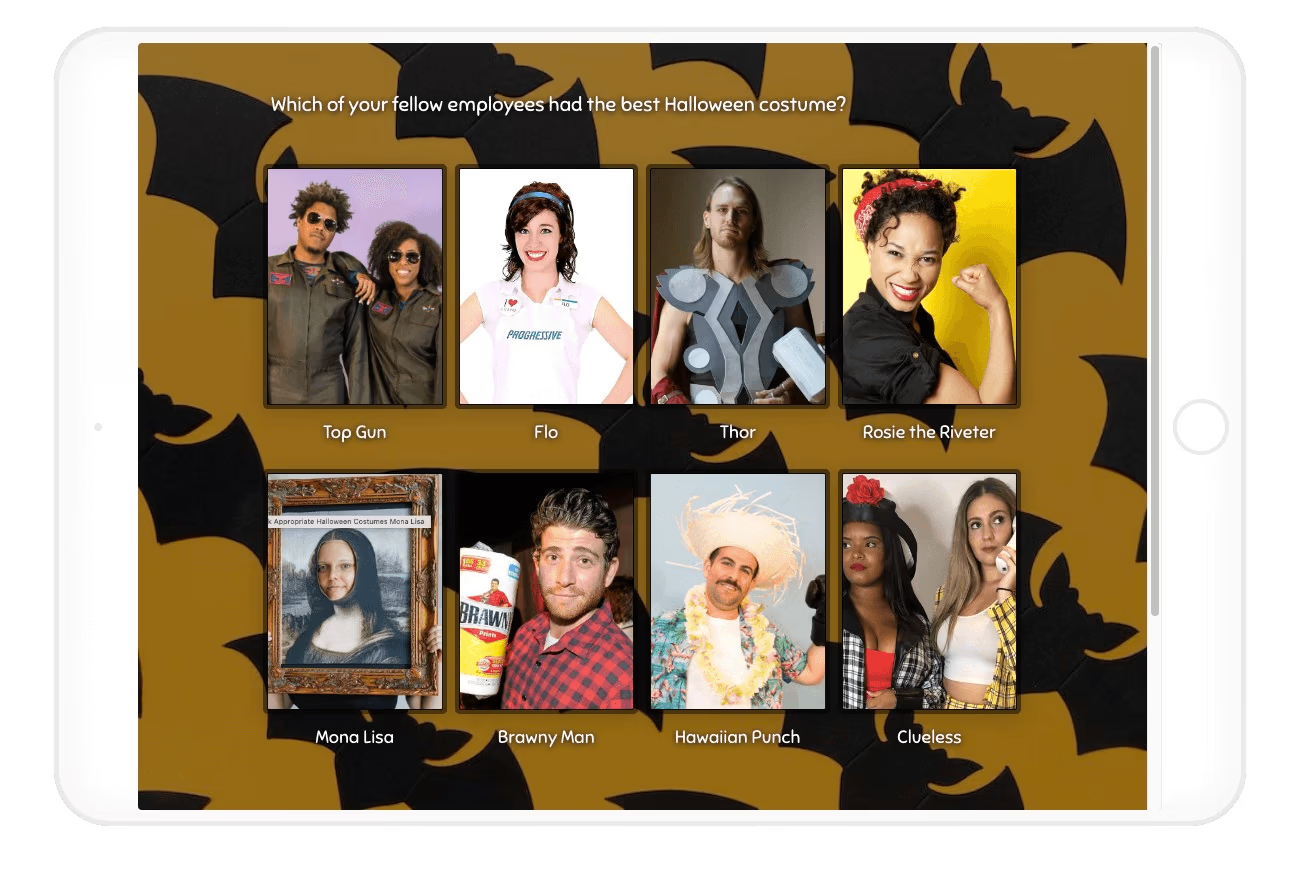
An adult costume poll can help coworkers, friends, or party guests vote on individual, couple, or group entries. In the example below, an office poll asks people to choose their favorite employee costume.
For your event, label each photo consistently and tell voters which award they’re choosing. If couples and singles have separate prizes, give them separate voting questions.
Children’s Halloween Costumes
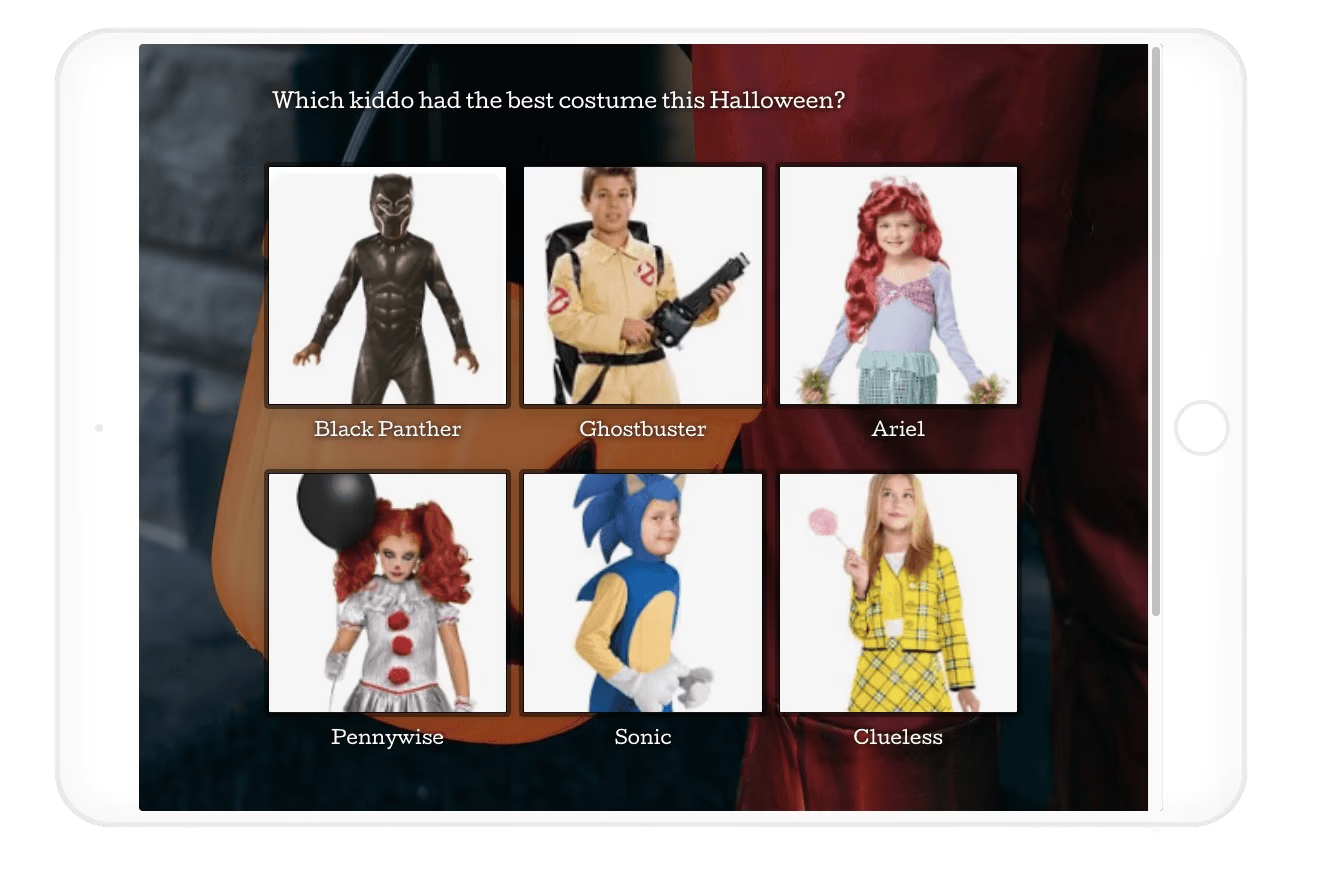
A children’s costume poll lets families compare the entries and vote within the age groups you’ve chosen. The example below shows a picture poll with character costumes.
Use a question such as “Which costume is your favorite in the children’s category?” Keep the instructions simple and arrange photo submission and permission through parents or guardians. For a mixed-age event, separate babies and toddlers from older children and teens where that suits your rules.
Pet Halloween Costumes
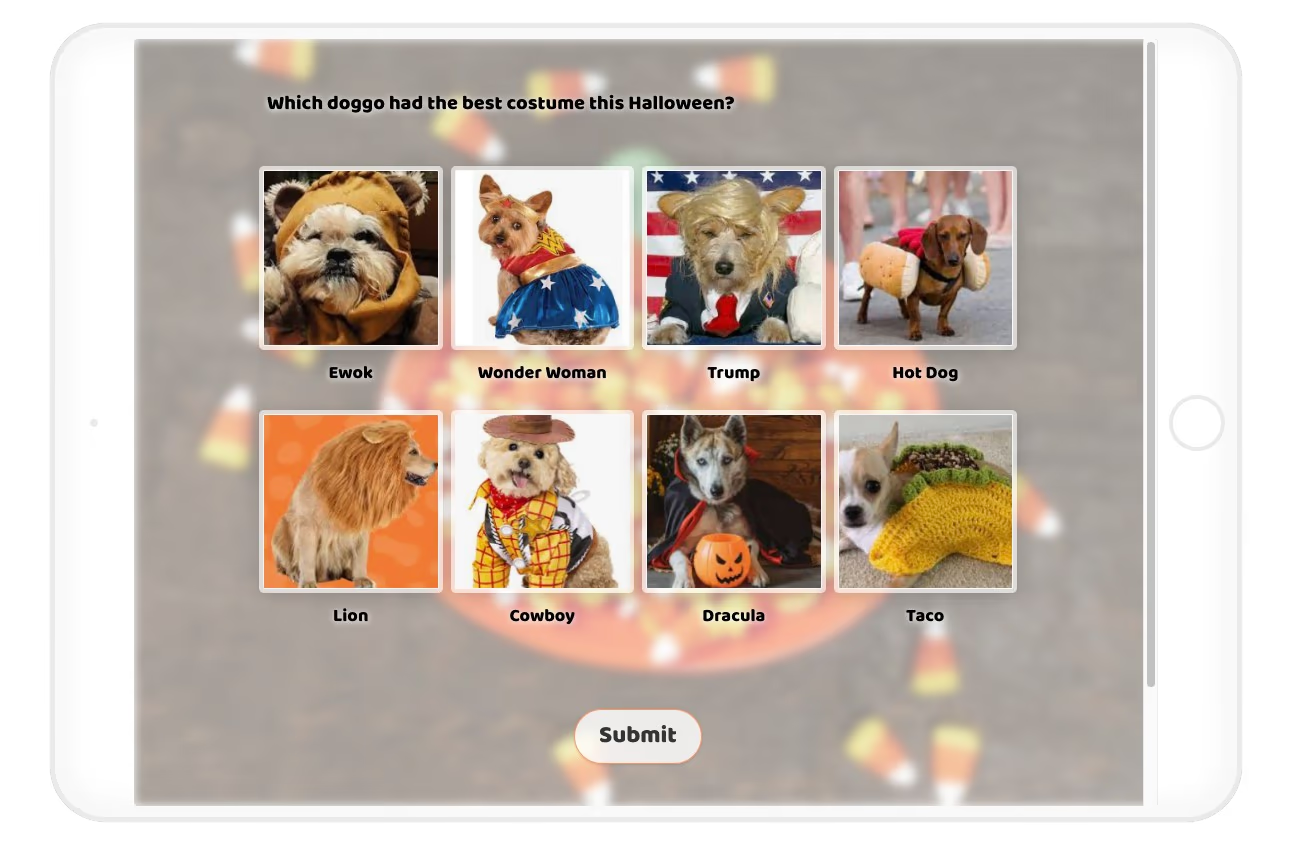
A pet costume poll gives animal companions their own place in the contest. The example below shows dogs dressed as characters, animals, and food—including a hot dog and a taco. Tough competition for the cutest award!
Keep pets comfortable. The ASPCA’s costume guidance advises dressing a pet only when it enjoys it, with an outfit that allows normal movement, sight, and breathing. Skip the outfit if your pet seems distressed.
Ask owners to send photos, add the eligible entries to your picture poll, and let people vote for their favorite.
Popular Halloween Costumes for 2026
Spirit Halloween’s 2026 costume trend report predicts these themes:
- Off Campus varsity looks.
- Toy Story characters.
- KPop Demon Hunters.
- Spider-Man and Power Rangers.
- Y2K-inspired outfits.
- Greek mythology.
- Fantasy adventurers.
- Horror characters.
- Fortnite and Halo.
- Funny inflatable costumes.
These are retailer predictions, not a search-volume ranking. Use them to inspire entries, then let voters choose their favorites. A homemade ghost can still steal the show!
History of the Halloween Costume
Halloween costumes have roots in traditions associated with Samhain, an ancient Celtic festival marking the end of the harvest and the beginning of winter. The Library of Congress’s history of Halloween traditions describes people wearing disguises to confuse spirits they believed walked the Earth.
Food offerings, disguises, and seasonal mischief helped shape later Halloween customs. Today, costumes are a chance to be scary, funny, or wonderfully unexpected. Trick or treat!
Ready to create your Halloween costume contest voting form? Start free with SurveyLegend, add your costume photos, and share the poll. Have a happy Halloween!
Which category will your audience vote on first: scariest, funniest, or cutest?
Frequently Asked Questions (FAQs)
What are common Halloween costume contest categories?
Common categories include scariest, cutest, funniest, most creative, most realistic, and coolest handmade costume. You can also award separate prizes for groups, couples, singles, babies and toddlers, children and teens, and pets. Give each category a short description and use a voting question that matches its award.
How do you determine a Halloween costume contest winner?
Determine the winner using the judging criteria or voting rules announced before the contest opens. For a single-choice people’s choice award, the entry with the most eligible votes wins. A ranked vote or judges’ award needs its own stated scoring method. Set the voting deadline and tie rule in advance.
How do you create a Halloween costume voting poll in SurveyLegend?
Create a survey, add a Picture Selection question, upload the costume photos, and label the entries. Choose single-choice or ranked voting, add clear instructions, preview the poll, and share its link. Follow responses in Live Analytics and select the winner using your announced rules.
Can children and pets enter the same Halloween costume contest?
Yes, children and pets can join the same event when your rules allow them. Give them separate categories or voting questions when they have different awards. Arrange children’s photo submissions through parents or guardians, and make pet participation comfortable and optional.
How do you handle a tie in a costume contest?
Handle a tie using the rule announced in advance, such as a shared award, runoff vote, or judge’s deciding vote. Apply that rule consistently rather than changing the process after you see which entries are tied.
How can I limit my costume contest to one vote per person?
You can use SurveyLegend to support a one-vote-per-person rule by combining participation limits, password protection, and a required email question. Keep “Allow multiple participations” OFF to reduce repeat submissions from the same browser. For an invited group, share a password with eligible voters and require their email address before the voting question. Check the collected addresses against your voter list and review duplicate or suspicious entries before counting the final results. A shared password controls access, while collecting an email gives you information to review; neither automatically verifies a person’s identity or blocks every repeat vote.
See our guides to preventing cheating in surveys and password-protecting a survey for setup instructions.