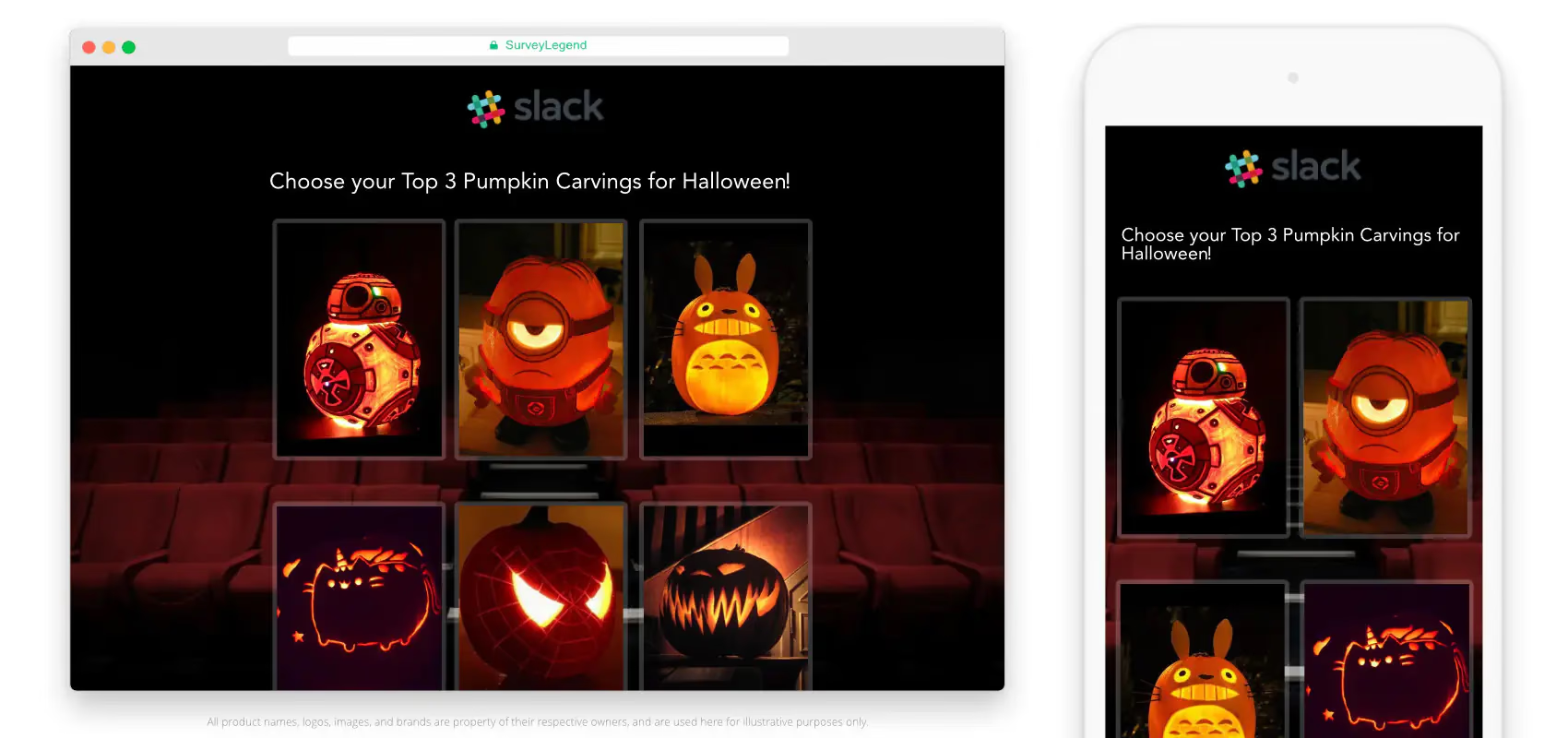
Host a pumpkin carving contest by setting the entry rules, choosing award categories, collecting pumpkin photos, and deciding how everyone will vote. A pumpkin carving contest can bring friends, families, classmates, or coworkers together, whether they carve at your event or submit a finished creation from home.
With SurveyLegend, you can turn your pumpkin entries into a picture voting poll. Upload the contestants’ photos, share your voting link, and let people choose or rank their favorites.
Halloween means creative costumes, pumpkin spice lattes, fun-size candies, and a little friendly competition. For Halloween 2026, which falls on Saturday, October 31, give everyone a chance to show off their spooky, silly, or surprisingly impressive pumpkins.
This guide covers planning, contest ideas, judging, promotion, and photo voting with SurveyLegend. You’ll also find a ten-step setup guide, an example picture poll, and a little jack-o’-lantern history. Ready to carve out some fun?
Introduction to the Event
A pumpkin carving contest is a competition in which people carve pumpkins and enter their designs for judging or audience voting. A pumpkin carving contest can award an overall winner, several category winners, or a people’s choice prize.
Choose a format that suits your group. Friends and family can carve together at a Halloween party, coworkers can display their pumpkins at the office, and students can enter a school or campus competition. An online contest lets people send in photos without bringing their pumpkins to the same place.
Carving tools and patterns from brands such as Pumpkin Masters can help beginners get started. Experienced carvers can try a more detailed design, while younger participants can join a separate decorating category. The goal is a little creativity, a little competition, and plenty of Halloween spirit!
Pumpkin Carving History
Pumpkin jack-o’-lanterns developed from an Irish tradition of carving scary faces into turnips. The National Museum of Ireland’s ghost turnip collection explains that people placed candles inside turnip lanterns to frighten others on Halloween. Pumpkin lanterns became an American development of that tradition.
You’ve probably carved a pumpkin since you were a child, but the name has a spooky story of its own. In the Irish folktale about Jack, a trickster is left wandering with a lantern after he is welcome in neither Heaven nor Hell. Versions of the story describe his light as a burning coal carried inside a hollowed-out turnip.
That’s the folklore behind the jack-o’-lantern. Your contestants can take the tradition in whichever direction they like: a classic scary face, a cheerful character, or something nobody saw coming!
Planning the Activity
Plan your pumpkin carving contest by choosing a date, a venue or online format, an entry deadline, and a method for selecting winners. Give contestants the rules before they start carving so everyone knows what counts as an eligible entry.
For Halloween 2026, choose a time that works for your group rather than assuming everyone is available on October 31. Set separate deadlines for entering the contest and casting votes, and state the time zone for an online event.
For on-site carving, provide sturdy workspaces, table covers, waste containers, and the supplies you’ve promised. Decide whether you’ll supply pumpkins and tools or ask people to bring their own. For a finished-pumpkin display, tell entrants when to arrive and how to label their creations. Have a backup location or weather plan for an outdoor event.
What rules should your pumpkin carving contest include?
Publish a short set of rules covering:
- Who can enter: Specify age groups, individual or team entries, and any workplace, school, or community restrictions.
- What people can submit: State whether the contest accepts carved pumpkins only or includes painted and decorated pumpkins in separate categories.
- How many entries are allowed: Choose a limit and apply it consistently.
- When entries and votes close: Give a date, time, and time zone.
- How winners are chosen: Explain the judging criteria or voting method, who can vote, and whether entrants can vote for themselves.
- What happens in a tie: Choose a joint award, a runoff vote, or a judge’s deciding vote before the contest opens.
- What winners receive: List the prizes and when you’ll announce the results.
How should you judge a pumpkin carving contest?
Judge pumpkins against the criteria you announced, such as originality, theme fit, carving skill, and overall appearance. Use the same criteria for every entry within a category.
For example, judges could score each criterion from 1 to 5 and add the scores. That’s one possible scoring system, so explain your chosen scale rather than leaving judges to invent their own.
A people’s choice award works differently: voters choose their favorite pumpkin from the entries. You can offer both a judges’ award and a people’s choice award, but report them separately. The most technically detailed carving and the crowd’s favorite don’t have to be the same pumpkin!
Pumpkin Carving Contests
Pumpkin carving contests range from a few friends competing for bragging rights to organized competitions with cash prizes. Contestants can carve during the event or bring pre-carved pumpkins, which reduces the mess and leaves more time for judging and voting.
Keep the prizes proportionate to your event. A small trophy, a themed gift basket, a gift card, or a bag of Halloween treats can make a local contest feel special. You can also make the creative process part of the fun by planning a pumpkin seed roasting activity alongside the contest.
For a larger competition, Pumpkin Masters’ 2026 carving contest lists a $2,500 grand prize. Check its current rules before entering; the prize and eligibility belong to that specific competition.
Need a little inspiration? Food Network’s Outrageous Pumpkins and Halloween Wars feature Halloween-themed competition.
And get this: there are even underwater pumpkin carving contests. Divers have carved pumpkins in oceans, lakes, and swimming pools. Your own contest can stay comfortably on dry land!
Ideas for Pumpkin Carving Contests
Choose pumpkin carving contest categories that reward different kinds of creativity, such as the scariest, funniest, cutest, or most original pumpkin. Separate age or skill groups when a single category would put beginners and experienced carvers on an uneven footing.
You might use these categories:
- Scariest pumpkin: The creepiest expression or spooky scene.
- Cutest pumpkin: A cheerful animal, friendly character, or sweet little face.
- Funniest pumpkin: A carving that gets the biggest laugh.
- Most creative pumpkin: An original idea or an unexpected use of the pumpkin’s shape.
- Most realistic pumpkin: A recognizable portrait, animal, or detailed object.
- Best use of hair: Yarn, string, or other materials turned into a playful hairstyle.
Give each category a short description so contestants and voters understand what they’re choosing. If originality matters, explain how it will be assessed; don’t assume a classic eyes-nose-mouth design is automatically a poor entry.
A shared theme can also help everyone get started. Try movie characters, animals, storybook scenes, or an office theme. For visual inspiration, browse creative pumpkin designs on Pinterest, then encourage entrants to make the idea their own.
Offer a separate no-carve category for painted pumpkins, glued-on accessories, and craft decorations. Children and anyone who prefers decorating can join in without competing directly against detailed carving work. Maybe the cutest pumpkin doesn’t need a single cut!
If you’re planning a whole Halloween celebration, you can pair the event with a Halloween costume contest. Give each competition its own entries and voting instructions so nobody mixes up the pumpkins and the pets.
Designing Your Pumpkin Carving Contest Survey
Create your pumpkin carving contest voting survey by adding a photo of each entry, explaining the voting rules, and asking people to choose their favorite. SurveyLegend’s picture surveys let respondents select images as answers, so voters can see the pumpkins they’re judging.
Ask contestants to send their photos to you before voting opens. Include painted pumpkins when your rules allow them, and place them in the category you announced.
What photos should contestants submit?
Ask for one clear main photo of each pumpkin, an entry name or number, and the category entered. Keep the photo requirements consistent so presentation doesn’t give one contestant an accidental advantage.
Use these practical instructions:
- Photograph the whole pumpkin against a simple background.
- Use enough light to show the carving or decoration.
- Keep framing and image proportions similar across entries.
- Avoid names, faces, or unrelated objects in the picture when they aren’t needed.
- Submit the entry by the stated deadline.
If illuminated pumpkins are part of your contest, tell everyone whether you want a daylight photo, a lit photo, or both. Apply the same requirements to each entry in that category.
Should voters choose one pumpkin or rank several?
Use a single-choice vote when you want each voter to pick one favorite. Use a ranked vote when you want voters to order several favorites and compare preferences across the entries.
Ready to put your entries to the vote? Visit our pumpkin carving contest voting page for picture-poll examples and help getting started.
For example, “Which pumpkin is your favorite?” suits a single-choice poll. “Rank your three favorite pumpkins” suits a ranked question. These produce different results, so explain how the winner will be determined before voting begins.
SurveyLegend collects responses as people vote. To learn more about the picture-poll format, see how to collect votes on images. You can show results at your event when that fits your rules, or reveal them after voting closes to keep the suspense going.
Steps to Creating Your Pumpkin Carving Contest Survey in 10 Easy Steps
Create a pumpkin carving contest survey in SurveyLegend by uploading the entries as picture choices, setting the voting method, and sharing the survey with your audience.
- Log in to your SurveyLegend account. Create an account first if you haven’t used SurveyLegend before.
- Create a new survey. Open the CREATE step and add a question that tells voters what they’re choosing.
- Add a Picture Selection question. Use the picture-based question type for your pumpkin entries.
- Open the image upload controls. Select the question and choose the upload option.
- Upload the pumpkin photos. Add the submitted images and label each choice with its entry name or number.
- Choose the voting method and layout. Select one favorite or use ranked voting for an ordered set of favorites. Adjust the picture layout and proportions so the entries are easy to compare.
- Style the survey in the DESIGN step. Choose a Halloween look, such as a dark theme or a suitable background. Keep the instructions readable, even when the pumpkins get spooky!
- Review the survey settings in CONFIGURE. Give the survey a recognizable name and review participation settings. When the setting is called “Allow multiple participations,” leave it OFF to limit repeat submissions from the same browser. Read the setting’s explanation if your interface uses a different label.
- Preview, test, and share the survey. Check the photos, instructions, and voting behavior on a phone and a computer. Then use the SHARE step to copy the link and send it by email, SMS, Slack, or social media.
- Monitor responses in Live Analytics. Follow the votes, end voting according to your published rules, and announce the winner using the method you explained.
For a one-vote-per-person contest, combine browser participation limits with password protection for an invited group and a required email question before voting. Review the collected email addresses against your voter list and check for duplicate or suspicious entries before counting the final results. See our guide to preventing cheating in surveys and our password-protection instructions. Browser limits reduce repeat submissions from the same browser; a shared password controls access, and an email question supports your review.
Check your plan’s current response, image, and feature allowances before inviting the audience. Starting free doesn’t mean every contest size or advanced option has unlimited access.
At a live event, you can project the results for everyone to watch when live display is part of your voting plan. Watching the votes roll in can add excitement; a final reveal can be just as much fun!
Promoting the Event
Promote your pumpkin carving contest with an invitation that explains who can enter, what to submit, the deadline, the prizes, and how people will vote. Keep the entry instructions and voting link distinct so contestants know where to submit a pumpkin and voters know where to choose a favorite.
For an office contest, use email, Slack, or your internal newsletter. For a school or campus event, share the invitation through the appropriate school channels. For a community contest, try posters at libraries, community centers, and local businesses, alongside your online announcement.
Create a Facebook event or share updates on Instagram and X when those channels fit your audience. A memorable event hashtag can help people find the entries and reminders. If you charge an entry fee, an early-bird discount or a team offer can be part of your promotion; explain the price and terms clearly.
Need a quick invitation? Try this:
“Calling all pumpkin artists! Join our Halloween 2026 pumpkin carving contest. Enter your spooky, silly, or creative pumpkin by [entry deadline]. Voting runs from [opening time] to [closing time], and winners will be announced on [date]. See the categories, prizes, and entry instructions here: [event link].”
Replace every bracketed detail before sending the invitation. Ask local groups or businesses about sponsorship when that fits your event, and remind people before the entry deadline and again before voting closes. Even the best pumpkin can’t win if its photo never makes it into the contest!
Executing the Pumpkin Contest
Run the pumpkin contest by checking entries against your rules, displaying the eligible pumpkins or photos, opening the vote, and announcing the winners after the deadline. Keep the process consistent with the invitation so nobody gets a surprise rule halfway through the event.
For on-site carving, set out tables, chairs, carving supplies, and cleanup materials. Choose an age-appropriate activity for younger participants, and arrange adult supervision where it’s needed. Battery-powered lights can provide the jack-o’-lantern glow without an open candle flame.
Add Halloween decorations and music, label each entry clearly, and explain how to vote before handing over the link. Check that the submitted photo and entry number match the pumpkin on display.
Tell voters whether results will be visible during voting or revealed afterward. For a judged competition, collect scores using the same criteria and apply the tie rule you published. For a people’s choice award, count the votes cast within your announced voting period.
Celebrate the winners with prizes and photos, and thank everyone who entered, voted, or helped. Small treats or participation awards can keep the event welcoming for the whole group. Ask permission before sharing identifiable photos of participants.
Afterward, note what worked and what needs changing next year. Were the categories clear? Did people understand the vote? Was there enough time to enter? A few simple improvements can make the next pumpkin contest even more fun.
Pumpkin Carving Contest with Images
A pumpkin carving picture poll shows voters the entries alongside the voting question. In the SurveyLegend example below, pumpkin photos are paired with a Halloween background and a playful font.
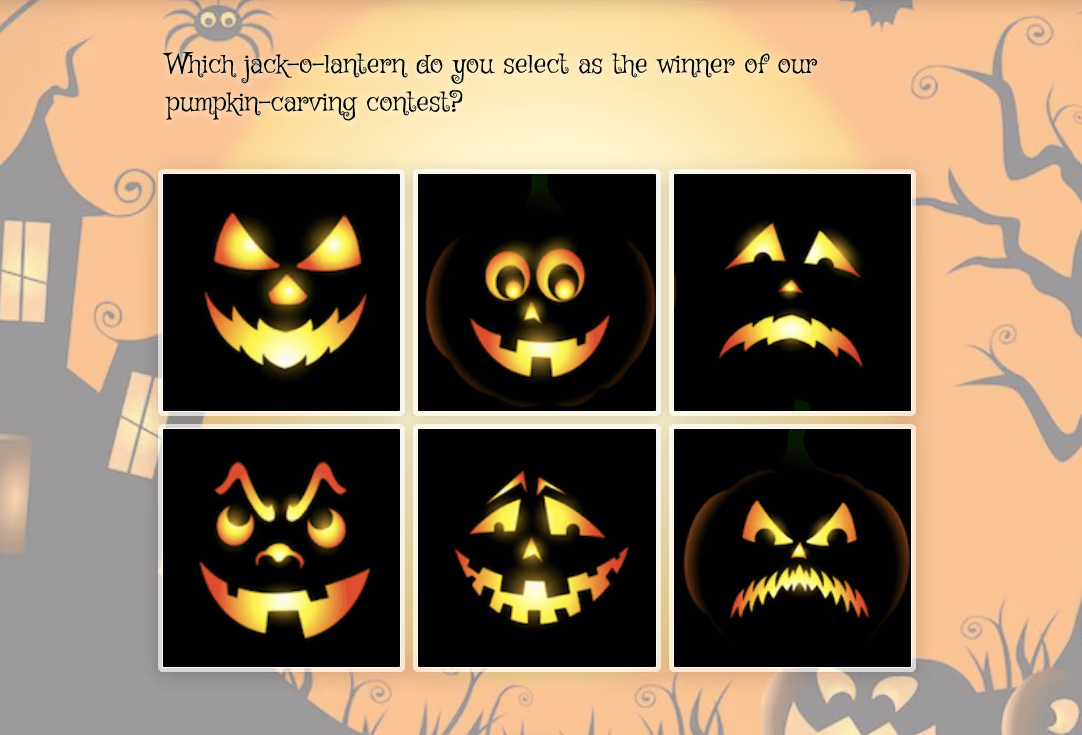
For your own poll, use the contestants’ entry names or numbers and tell people whether they should select one favorite or rank several. Keep those instructions consistent with the voting type you selected.
Ready to put your pumpkins to the vote? Start free with SurveyLegend, add your entries, and invite everyone to pick a favorite. Have a happy Halloween!
Now it’s your turn: will your group vote for the scariest pumpkin, the funniest, or the one that makes everyone say, “How did they carve that?”
Frequently Asked Questions (FAQs)
How do you host a pumpkin carving contest?
Host a pumpkin carving contest by choosing a date and format, publishing entry rules, deciding the award categories, and setting a judging or voting method. Tell contestants whether to carve on-site or submit a finished pumpkin or photo. Set entry and voting deadlines, explain how ties are handled, and announce the prizes before the contest opens.
Who is the fastest pumpkin carver?
Guinness World Records lists Stephen Clarke’s record of 16.47 seconds, achieved in New York on October 31, 2013. The record required a complete pumpkin face with eyes, a nose, a mouth, and ears.
Source: Guinness World Records.
How do people vote in a pumpkin carving contest?
People can vote through a picture poll showing a photo of each pumpkin entry. Ask voters to choose one favorite or rank several favorites, and explain how the votes will determine the winner. SurveyLegend’s Picture Selection question lets you present the entries as image choices.
What are good pumpkin carving contest categories?
Good categories include scariest, cutest, funniest, most creative, most realistic, and best use of hair or accessories. Describe what each award recognizes and separate age or skill groups when appropriate. A separate no-carve category lets painted and decorated pumpkins compete on their own terms.
Can painted pumpkins enter a pumpkin carving contest?
Yes, painted pumpkins can enter when the contest rules allow them. Give painted or decorated pumpkins their own category when you want carving skill to remain a separate judging criterion. Tell participants which materials and decorations are permitted before they start.
How do you handle a tie in a pumpkin carving contest?
Handle a tie using the method published in your rules, such as a joint award, a runoff vote, or a judge’s deciding vote. Choose the method before voting opens and apply it consistently. Don’t introduce a new tie rule after seeing who has tied.
How can I limit my pumpkin contest to one vote per person?
You can use SurveyLegend to support a one-vote-per-person rule by combining participation limits, password protection, and a required email question. Keep “Allow multiple participations” OFF to reduce repeat submissions from the same browser. For an invited group, share a password with eligible voters and require their email address before the voting question. Check the collected addresses against your voter list and review duplicate or suspicious entries before counting the final results. A shared password controls access, while collecting an email gives you information to review; neither automatically verifies a person’s identity or blocks every repeat vote.
See our guides to preventing cheating in surveys and password-protecting a survey for setup instructions.