 New Features:
Thanks for constantly chatting with us and giving us feedback and asking for new features. Together with you, we are making SurveyLegend the best survey tool that the internet has ever seen ?.
 Kiosk mode surveys
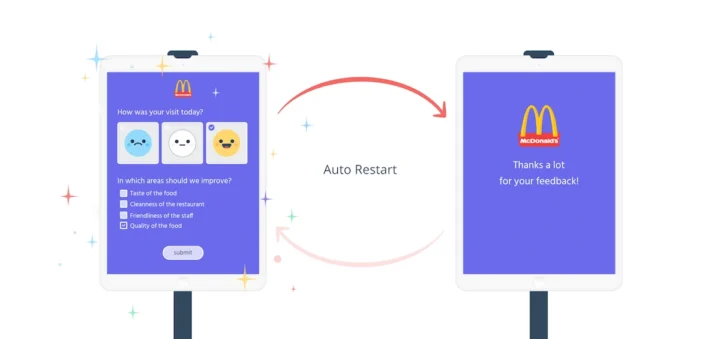
Now with our Kisok mode feature, you can do so called “in-store surveys“, which automatically restart when submitted. And of course if a respondent partially fills-in the questionnaire and leaves it, the form can smartly restart itself.
This way you can collect fresh feedback from people who visit your shop, office, store, or business. All you need is a tablet, and a SurveyLegend account.
Learn more about our Kiosk mode.
 Spam bots protection
We got litterally 2 reports from our users whose surveys have been victims of spam-bots, which means somebody had written a custom script which could participate in their survey and vote to tweak their results.
Well, “2” was already too much for us. Therefore, we made an anti-spam-bot system which measures many variables to see whether a robot taking the survey or a human. When our system detects a spam-bot, it will silently ignore their votes, so nothing will be collected or registered in our database.
Also, if our anti-spam system gets suspecious about a respondent but cannot judge by 100% certainity, it will instead mark their responses in the exported data as “suspected spam bot”. This way users can decide and filter them out.
Additionally, our new system automatically goes through old collected data and removes any eventual spam-bot responses.
We will keep improving our spam-bot protection code, and constantly make it smarter to mitigate more types of spam bots.
 IFrame Notifications
From now on, you ask your embedded surveys to send a notification to your website. Enabling this setting allows you to send a notification message to the HTML page which contains your IFrame, as soon as responses are submitted. This opens up many possibilities for you. For instance you can hide the IFrame containing the survey, load another questionnaire, send the user to another page, or perform any desired actions after your respondent submits their answers.
Learn more about embedded surveys using IFrames.
 Open image links in the same window
Recently we added the possibility of adding redirect links to images within a questionnaire. With this update you can make the links open in the same browser tab as the survey, or choose to open them in a new browser tab.
Learn more about Adding redirect links to images within a survey.
 Hide text lables under Opinion scale choices
The Opinion Scale question is variation of the Likert-type question, but it is visually different. Choices are visually presented on a “scaled” or “ranged” clickable set of choices, and can have lables under the choices to clarify the scale.
However, sometimes you may want to hide these lables completely, and from now on, you can do so.
Learn more about Opinion scale question.
 Time spent in a survey is reflected in exported data
Now when you export collected data, the time spent by each respondent to answer your questions is reflected there as well.
Learn more about Exporting survey data.
 Hide choice text for respondents
With our latest app, you can easily hide the choice text which was displayed under each picture in the Picture selection question type. However any title you type will appeear in the exported data and in your live analytics.
Learn more about customizing picture selection question.
 Hide “Participation” and “Geographical reach” charts from shared analytics page.
You can share the collected results of a survey publicly, either after the survey is submitted, or via a link. However, some users do not want to show the number of participants, and some users don’t want to show the map. So we have made it possible to hide these two charts now.
 UX / UI updates
Constantly improving the user experience (UX) and User Interface (UI) of our solution has always been the core of our company. During the past few version releases, we have improved lots of details in the app. Here is a list of some of them.
 New configure step
Previously, all survey settings where placed in the first step of creation, which was called “Start step”. Now that step is totally gone, instead we have a new step called “Configure”, which hosts all settings of the survey you are editing.
Additionally, we have divided up the settings to several sections, which will help you navigate between them more easily. Under each section, relevant settings are grouped into cards, and can easily be understood.
Further, the new cards provide more visual aid for abstract settings which do not otherwise have an instant visual representation, for example a “Notification email”.
 New share step
We have also re-designed the “Share” step and divided its settings into several sections. Under each section, relevant settings are grouped into cards, and can easily be found and manipulated.
 New Live Analytics UI
Redesigned the Live analytics interface to provide more information in less space.
 Export receipts of your subscriptions
Now you can export a receipt of your new subscriptions (which are made after September 2018), by navigating to My account. This helps companies and their bookkeeping needs.
 More informative messages
Now specially in the new Configure step, you will see explanation about why a setting is locked and cannot be changed by you. It is usually due to conflicting settings, or some features which require a setting to be ON or OFF.
 Whitelabled loading screen
Now users with “Legendary” subscription level will have a completely whitelabled loading screen. We used to show our animated diamond logo before, when survey was being loaded.
Other improvements
- Live analytics loads much faster for surveys with large amount of responses. This is thanks to new technologies which enabled us to load and calculate collected data in smaller chunks.
 Bug fixes
- Fixed a bug where having a “required question” would not let respondents go back to previous pages of a survey, unless they answered the question.
 Security
- Updated all 3rd-party plugins and libraries used in our website and app.
- And just like always, we’ve been constantly upgrading our WordPress site as soon as new security updates were released.
We do hope that you enjoy these new enhancements and use them to create even better online surveys and forms. But don’t forget that the greatest feature that we’ve been working on is coming soon. So stay in touch and please spread the word about us to other Legends!
Love/ Team SurveyLegend
p.s.
If you find any bugs, please let us know, and if you have any feedback or feature requests, don’t hesitate to tell us. We always prioritize our users’ wishes in our development plans.