Making reports with Likert Scale questions
Traditionally, researchers make a sum of all items’ scores in each Likert Scale question, to evaluate a specific trait (e.g. is the participant generally “Satisfied” or “Dissatisfied”, after a purchasing experience). For a deeper analysis, researchers may cross-tabulate the score mean with contributing factors.
The word “Scale” used in the name, refers to the total sum of all Likert Items used in the question. For example, in a question with 5 Likert Items and 4 Selection Choices, each item has answers from 1 to 5, but the scale for this question is between 4 to 20. Four is the sum of all items, if all of them get 1 point from a respondent; and 20 is the sum, if all get 5 pints.
Making Likert Scales correctly
Ask about the same topic
Likert Scaled questions are useful for overall measurements about specific topics, opinions, or categories; when all items in the same question are related to each other.
But if you use a mixture of unrelated items in the same survey, keep in mind that you are not making a Likert Scaled question, therefore, you cannot use the total score of that question as a reliable data source. You may have other intentions for mixing the questions and combining them into one; but be carefully with analysing the data.
Use “labels” instead of “numbers”
It might be easier for you to evaluate the answers, by calculating numbers. But for respondents it is very hard to relate to numbers when they are trying to answer your questions.
For example, when you ask about the quality of different aspects of your service, it is easier to let the respondents choose an item between these labels (Poor, Fair, Good, Very good, Excellent), than asking them to choose a number between 1 to 5.
Use odd options
Scales with an odd number of values have a midpoint, which makes them easier to analyse (e.g. 0 to 2, or 1 to 7).
Avoid giving more than 7 options
Studies show that giving more than 7 choices to respondents in Likert Scale questions may result in low quality data. The reason is that people tend to choose a random answer, when there are too many choices. Perhaps because it is usually hard for most people to keep a meaningful concept of more than 7 items in their short memory.
Include all possible answers
Scales should cover the entire span of responses. For example, if a question asks “How delicious was our ice-cream?” and the answers range from “Extremely delicious” to “Moderately delicious”, respondents who think your ice-cream was “Not delicious at all”, do not have the right choice and cannot answer correctly.
Be continuous
When formulating the response options, make sure that the logical distance between scale points is equal.
This can be difficult when using words instead of numbers. If you need some inspirations about different ways of making Likert-type response options for different topic, we recommend you to have a look at the following guide. This will help you easily choose the right wording and phrasing for each subject.
Using N/A choices
Sometimes, researchers provide an extra selection choice for respondents who do not have any specific opinion about the Liker Items presented. This extra item is phrased differently, but usually is written as “N/A”, “Not sure”, “Not sure yet”, “Does not apply”, or similar.
Earlier, we talked about using “labels” instead of “numbers” for selection choices, but we also mentioned that selection choices are scaled, and therefore each choice would get a specific number which is used to calculate the sum of all items in the degree.
However, there is no reason to show these numbers to the respondents and they should be used when you analyse the data and make your survey reports. One additional reason for not showing any numbers to respondents is that there are no rules for choosing the number in your scale. In some cases, you may want to use 0 as “Strongly disagree” and “10” as “Completely agree”. So your data have a natural but unseen midpoint and a base 10 foundation.
But if you add the extra choice of N/A to your responses, you usually do not need to give it a number (11 in this case). Keep in mind that this “undecided” states are not usually considered as real options. This is usually just a way for respondents to skip answering, if they don’t feel they have or know the right answer.
All in all, it is up to you how to analyse these collected data. In some situation, for example if you write “I don’t know” or “I don’t want to say” for your N/A choices, respondents answer to that question may bear an interpretable meaning.
 Need to know more?
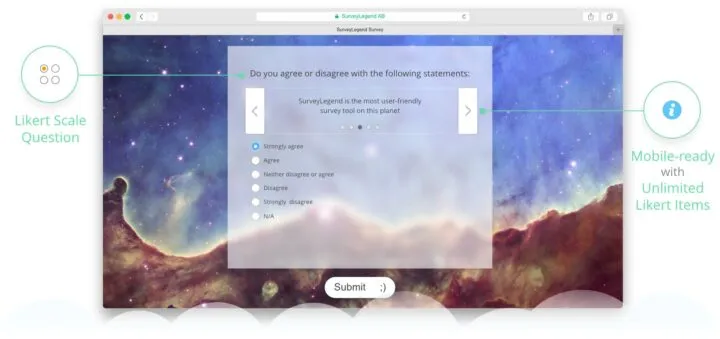
With SurveyLegend, you easily can make Likert Scale questions which are responsive and can beautifully adjust even to small screen of mobile phones. You can have literally unlimited number of response choices, and even add pictures to your Likert Scale questions. Have a look at our user guide, and learn more about all your legendary powers ; )
 Learn to make Likert Scale questions…
Also, writing Likert-type responses (selection choices) can sometimes be tricky. It is important to formulate your selection choices correctly, when you need to get an overall measurement of a particular topic, opinion or experience from your survey respondents. The following guide will give you a useful set of examples for Likert-type responses, covering different topics.