



 Share survey results publicly using a link
This method of sharing the results is especially useful if you want to share your collected data after
your research ends, either on its own or along with a report. This is also a perfect feature for public
polls and questionnaires, such as predictions for sports and games, political surveys for elections,
or anything that has to do with public opinion. The biggest advantage of sharing your survey data with
using this method is that you do not have to keep the recipients up-to-date with latest changes in the
statistics. Because you are sending them to a Live Analytics page, they will be able to see the survey
results in real-time. Let’s say you send this link to your client or supervisor, and they can just keep
themselves up to date with latest changes. It is an amazing feature and saves lots of time for you and
for them.
In this article: How to activate • How it works • Promoting Survey & Results • Respondents’ privacy • How to deactivate How activate this function
You can activate this feature at any time you wish, to safely send the link to whomever you like. To enable this function, you can choose your survey from the list, or go to the Live Analytics
of the respective survey, and then just follow the following instructions:
Live Analytics
of the respective survey, and then just follow the following instructions:
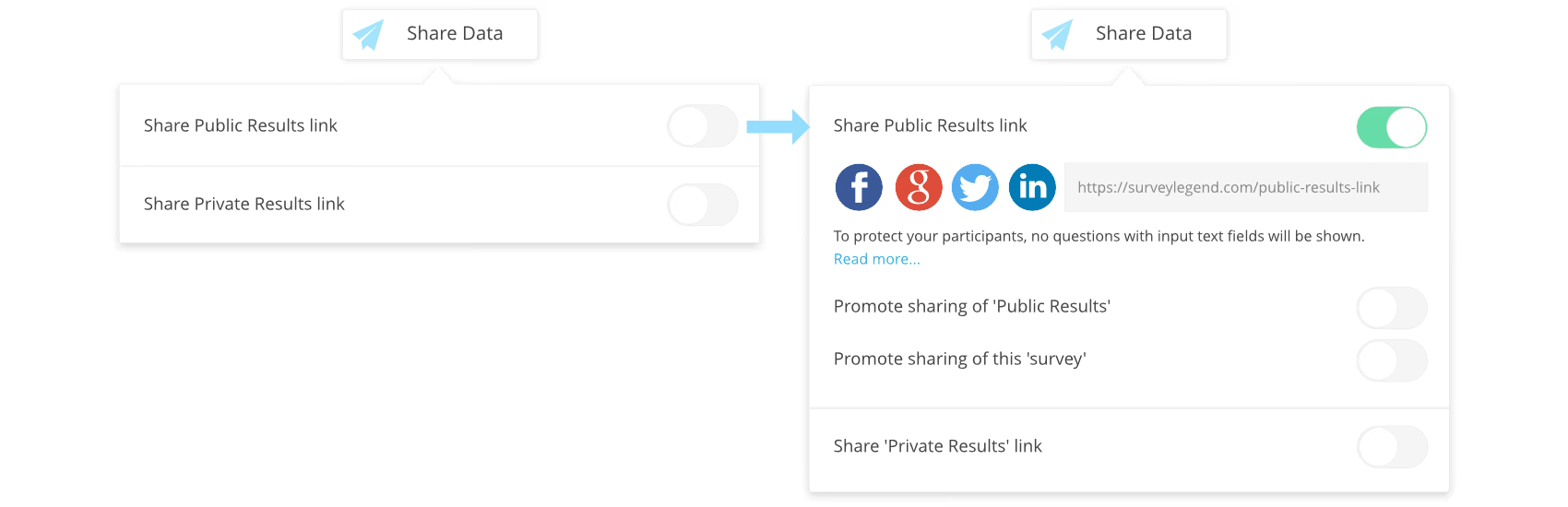
Clicking on the Share Data button gives you options of sharing your surveys privately or publicly.
-
Find the
 Share Data
button in your dashboard, or on the top the Action Bar in Live Analytics.
Share Data
button in your dashboard, or on the top the Action Bar in Live Analytics.
-
Right there you will notice a setting called “Share Public Results link
 “. You can easily enable this by toggling the ON/OFF button.
- Enabling this setting will generate a link to the Public Results of the survey. You can copy the link, or simply click on the social media buttons beside it, to instantly share it with others.
Promote sharing of Public Results
When you enable the Public Results page, SurveyLegend gives you a promotional options as well. You can let your respondents to share the Public Results page, using the Public Link.Note:
By default, these two settings are OFF; unless you have activated another feature called “Promote sharing of Public Results” in your survey settings. That feature requires the link to your Public Results page to be
enabled. Therefore, turning off “Share Public Results link” here, will naturally disable the
other feature for “Promote sharing of Public Results” as well. “Promote sharing of Public
Results” works exactly the same way because it is exactly the same component, no matter where
you enable it. If you enable it in syrvey settings, it will be seen as enabled here in this
menu as well. And if you disbale it from this menu, it will be seen as disabled in survey
settings as well. Read more about Promoting the public results page…
 What about privacy of my respondents?
For SurveyLegend, privacy and security of
surveyors and respondents is always the first priority. So we have have made sure to protect
your respondents’ personally identifiable data, when you share the survey results publicly. That’s why
we call this feature “Public Results”. Therefore to protect personally identifiable information of
your respondents, SurveyLegend removes all answers that users type manually; and the displays rest of
the questions in the Public Results page. The reason behind this is that users might write their names,
addresses, phone numbers, emails, etc… and we/you cannot publish such information online for eveyone.
Note:
The only text input that is shown in the Public Results is the text that respondents write in
“other” choice of Single Selection or Multiple
selection. Because this naturally will not include any personally identifiable information.
 Other ways of sharing your survey data…